A wrong plugin can break your website in ways many WordPress users don’t expect. WordPress plugins add powerful features, but installing the wrong plugin may cause errors, security vulnerabilities, or even crash your entire website.
Many beginners install plugins without checking compatibility, developer reputation, or performance impact. As a result, their website becomes slow, unstable, or inaccessible.
In this guide, you’ll learn how a wrong plugin can break your website, what risks to avoid, and how to safely choose WordPress plugins.
Table of Contents
-
What Is a WordPress Plugin?
-
Why the Wrong Plugin Can Break Your Website
-
Common Problems Caused by Bad Plugins
-
How to Identify Risky WordPress Plugins
-
How to Prevent Plugin Conflicts
-
Best Practices for Choosing Safe Plugins
-
Final Thoughts
What Is a WordPress Plugin?
A WordPress plugin is software that adds new functionality to your website.
Examples include:
-
SEO tools
-
Security protection
-
Page builders
-
WooCommerce extensions
-
Speed optimization tools
The official plugin directory can be found here:
DoFollow external resource:
https://wordpress.org/plugins/
Plugins make WordPress flexible, but installing the wrong one can introduce serious issues.
Why a Wrong Plugin Can Break Your Website
A wrong plugin can break your website because not all plugins are built with quality coding standards.
Some plugins may:
-
Conflict with themes
-
Conflict with other plugins
-
Use outdated code
-
Contain malware
-
Consume excessive resources
Even a single poorly coded plugin can make your website slow or completely inaccessible.
Common Problems When a Wrong Plugin Can Break Your Website
1. Website Crashes
A poorly coded plugin may cause the famous WordPress white screen of death.
This means your site becomes completely blank and inaccessible.
Internal resource:
Read also → Common WordPress Errors and How to Fix Them
2. Plugin Conflicts
Sometimes plugins don’t work well together.
When this happens:
-
Buttons stop working
-
Layout breaks
-
Features disappear
This is a common way a wrong plugin can break your website.
3. Security Vulnerabilities
Some plugins contain vulnerabilities that hackers exploit.
A compromised plugin can allow attackers to:
-
Inject malware
-
Redirect visitors
-
Steal data
-
Deface your website
External resource (DoFollow):
https://wordpress.org/support/article/hardening-wordpress/
4. Slow Website Performance
Heavy plugins can dramatically slow down your website.
Problems include:
-
Large scripts
-
Too many database queries
-
Poor optimization
Slow websites hurt SEO and conversions.
Internal resource idea:
Read also → Best Caching Plugins for WordPress in 2026
5. Broken Website Layout
Some plugins conflict with page builders like Elementor.
When a wrong plugin can break your website, the result might be:
-
Broken design
-
Missing sections
-
CSS conflicts
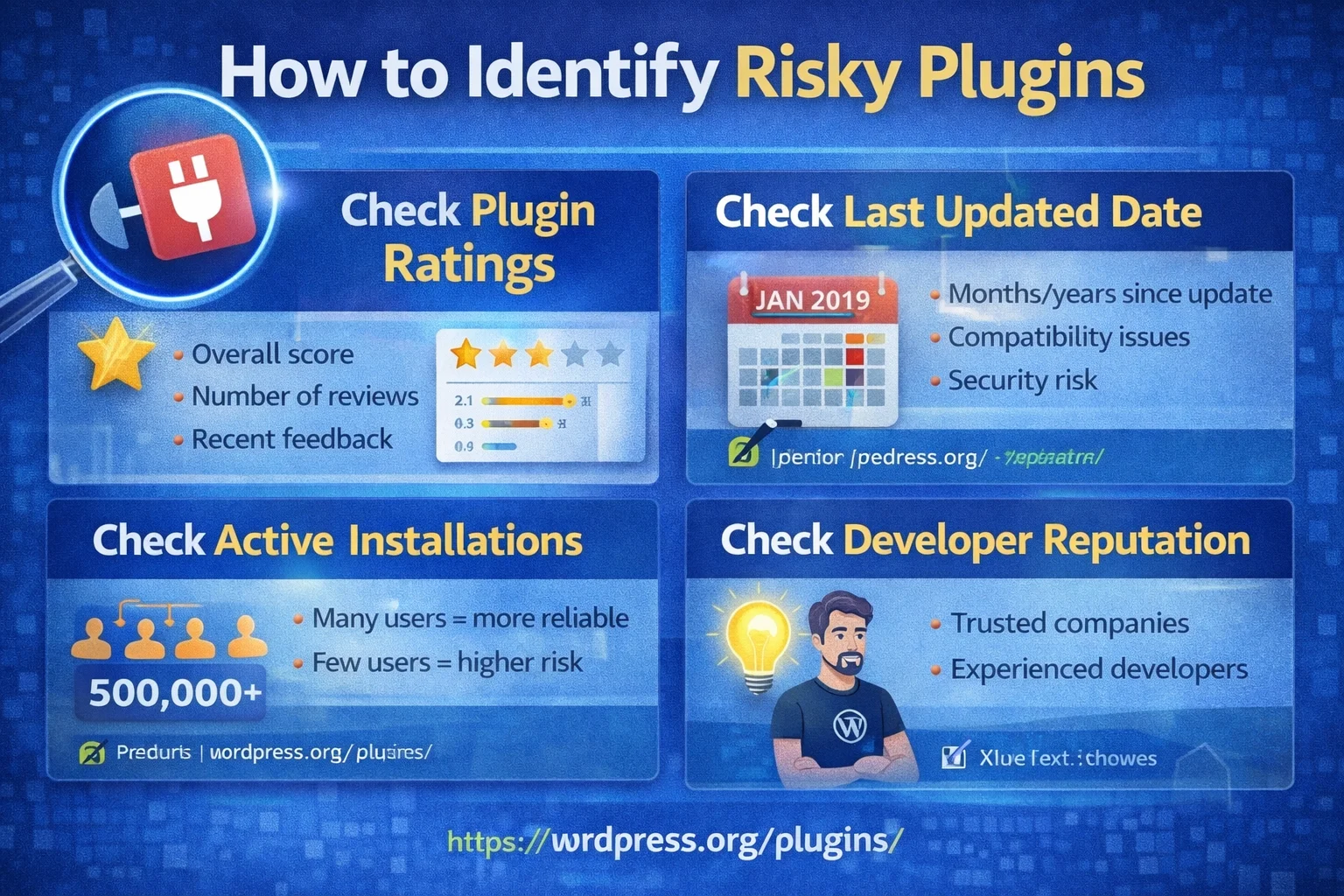
How to Identify Risky Plugins
Before installing a plugin, check these factors.
1. Plugin Ratings
Always review ratings and feedback.
Low ratings often indicate bugs or poor support.
2. Last Updated Date
Avoid plugins that haven’t been updated in years.
Outdated plugins often cause compatibility issues.
3. Active Installations
Plugins with many users are usually more reliable.
Example:
-
100,000+ installs = trusted plugin
-
50 installs = potentially risky
4. Developer Reputation
Check the developer website and support forum.
Professional developers maintain their plugins regularly.
How to Prevent Plugin Conflicts
To avoid problems where a wrong plugin can break your website, follow these steps.
Test Plugins on Staging Site
Always test plugins before installing them on your live site.
Install Only Necessary Plugins
Too many plugins increase the chance of conflicts.
Quality matters more than quantity.
Keep Plugins Updated
Updates fix bugs and security vulnerabilities.
Regular updates keep your site stable.
Backup Your Website
Always create backups before installing new plugins.
If something breaks, you can restore your site quickly.
External backup resource (DoFollow):
https://wordpress.org/plugins/updraftplus/
Best Practices to Avoid the Wrong Plugin
Follow these simple rules.
✔ Install plugins only from trusted sources
✔ Check compatibility with your WordPress version
✔ Avoid duplicate plugins doing the same job
✔ Test new plugins first
✔ Read documentation and reviews
These steps reduce the risk that a wrong plugin can break your website.
Final Thoughts
A wrong plugin can break your website in many ways, from performance issues to complete site crashes. While plugins are essential for extending WordPress functionality, choosing them carefully is critical.
By installing trusted plugins, keeping them updated, and testing before activation, you can prevent major problems and keep your WordPress website secure and stable.
Always remember: fewer high-quality plugins are better than many risky ones.