
The Elementor latest version 4.0.8 introduces powerful improvements, better speed optimization, enhanced design flexibility, and critical bug fixes for WordPress website owners.
If you use Elementor to build websites, updating to the newest release can improve performance, security, and editing experience. In this guide, we will explore the major updates in the Elementor latest version 4.0.8, explain how to update safely, and share useful tips to avoid compatibility problems.
Whether you are a beginner or professional web designer, this article will help you understand why Elementor 4.0.8 matters in 2026.
Table of Contents
- What is Elementor Latest Version 4.0.8?
- Key Features in Elementor 4.0.8
- Performance Improvements
- New Design Capabilities
- Bug Fixes and Stability Updates
- How to Update Elementor Safely
- Compatibility Requirements
- Common Update Issues and Fixes
- Should You Update to Elementor 4.0.8?
- Final Thoughts
What is Elementor Latest Version 4.0.8?
The Elementor latest version 4.0.8 is the newest update of the popular WordPress page builder plugin developed by Elementor.
This release focuses on:
- Faster website loading
- Improved editor stability
- Better mobile responsiveness
- Enhanced widget controls
- Security and compatibility updates
Elementor continues to be one of the most popular website builders for WordPress users worldwide.
You can download Elementor directly from:
Key Features in Elementor Latest Version 4.0.8
The Elementor latest version 4.0.8 introduces several new features that improve workflow and website performance.
1. Faster Editor Loading
The Elementor editor now loads faster compared to previous versions. This improvement helps users edit pages without lag or freezing.
2. Improved Flexbox Containers
Flexbox Containers have become more stable and responsive. Designers can now create advanced layouts more efficiently.
3. Better Responsive Controls
Responsive editing tools have been improved for:
- Mobile devices
- Tablets
- Desktop layouts
This helps websites look better across all screen sizes.
4. Enhanced Global Styling
Global typography and color settings are now easier to manage, saving time during website design.
Elementor Latest Version 4.0.8 Performance Improvements
Website speed is extremely important for SEO and user experience.
The Elementor latest version 4.0.8 includes major performance enhancements such as:
- Reduced CSS loading
- Optimized JavaScript delivery
- Improved lazy loading
- Better image rendering
These improvements can help improve Core Web Vitals scores.
Learn more about performance optimization from:
New Design Capabilities in Elementor Latest Version 4.0.8
Design flexibility has improved significantly in this release.
New Features Include
- Advanced spacing controls
- Improved motion effects
- Better container alignment
- Enhanced hover animations
These tools help designers create modern and professional websites easily.
Popular themes compatible with Elementor:
- Astra
- Hello Elementor
- GeneratePress
Bug Fixes and Stability Updates
The Elementor latest version 4.0.8 also fixes many known issues from older releases.
Important Bug Fixes
- Fixed editor loading errors
- Resolved widget rendering problems
- Improved compatibility with PHP 8.2
- Fixed responsive display glitches
- Reduced memory usage
These updates make Elementor more stable for large websites.
How to Update Elementor Latest Version 4.0.8 Safely
Before updating Elementor, always create a full backup of your website.
Step-by-Step Update Guide
- Login to WordPress dashboard
- Go to Plugins → Installed Plugins
- Find Elementor
- Click Update Now
- Wait for installation to finish
- Clear website cache
Recommended Backup Plugins
Compatibility Requirements for Elementor 4.0.8
To run the Elementor latest version 4.0.8, your server should meet these requirements:
| Requirement | Recommended |
|---|---|
| WordPress | 6.x |
| PHP | 8.1 or higher |
| Memory Limit | 256MB |
| MySQL | 5.7+ |
Using outdated hosting environments may cause Elementor errors.
Recommended hosting providers:
Common Elementor 4.0.8 Update Issues and Fixes
Sometimes users experience issues after updating Elementor.
Elementor Editor Not Loading
Possible fixes:
- Clear cache
- Disable conflicting plugins
- Increase PHP memory
Layout Problems
Try regenerating CSS files:
Elementor → Tools → Regenerate CSS & Data
Plugin Conflicts
Temporarily disable:
- Cache plugins
- Security plugins
- Optimization plugins
Internal Link Suggestions
Add these internal links on your website:
- How to Fix Elementor Not Loading Issue
- Best WordPress Themes for Elementor
- How to Speed Up WordPress Website
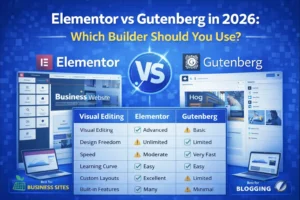
- Elementor vs Gutenberg Comparison
These internal links improve SEO and user engagement.
Suggested Images for SEO
Image 1
- Screenshot of Elementor 4.0.8 dashboard
- Alt text: Elementor latest version 4.0.8
Image 2
- Screenshot of Flexbox Containers
- Alt text: Elementor latest version 4.0.8 features
Image 3
- Screenshot of Elementor editor improvements
- Alt text: Elementor latest version 4.0.8 update
Suggested YouTube Video
Embed a tutorial video:
“Elementor Latest Version 4.0.8 Full Review & Update Guide”
You can search for tutorials on:
Why Elementor Remains Popular in 2026
Elementor continues to dominate the WordPress page builder market because it offers:
- Drag-and-drop editing
- Beginner-friendly interface
- Large template library
- Strong community support
- WooCommerce compatibility
It is widely used by freelancers, agencies, bloggers, and business owners.
Final Thoughts
The Elementor latest version 4.0.8 brings powerful improvements for WordPress users in 2026. From better performance to enhanced design controls, this update makes website building faster and easier.
If you want improved speed, stability, and modern design tools, updating to Elementor 4.0.8 is highly recommended.
Always backup your website before updating and test changes carefully to avoid compatibility issues.
FAQs
Is Elementor 4.0.8 stable?
Yes, Elementor 4.0.8 includes multiple stability and bug-fix improvements.
Does Elementor 4.0.8 improve website speed?
Yes. This version includes CSS and JavaScript optimizations for better performance.
Is Elementor 4.0.8 compatible with WordPress 6.x?
Yes, it is designed to work with modern WordPress versions.
Should I backup before updating Elementor?
Absolutely. Always create a full website backup before any major update.